
E-Reader Integration
Bookworm integrates with e-readers and reading apps to keep your reading progress in sync. Currently, native support is available for KOReader via the KOSync protocol. Other reading apps can integrate via the generic webhook endpoint.
KOReader (Native Support)
Section titled “KOReader (Native Support)”KOReader is a free, open-source reading app available for Kindle, Kobo, PocketBook, Android, and other devices. Bookworm implements the KOSync protocol, so KOReader can sync reading progress directly.
How It Works
Section titled “How It Works”- KOReader sends progress updates to Bookworm whenever you read.
- Bookworm matches the book to one in your library (by title and author).
- Your reading progress and sessions update automatically.
1. Generate an API Key
Section titled “1. Generate an API Key”- Go to Settings → Integrations.
- Under E-Reader Integration, click Generate API Key.
- Copy the generated key — you’ll need it for KOReader.
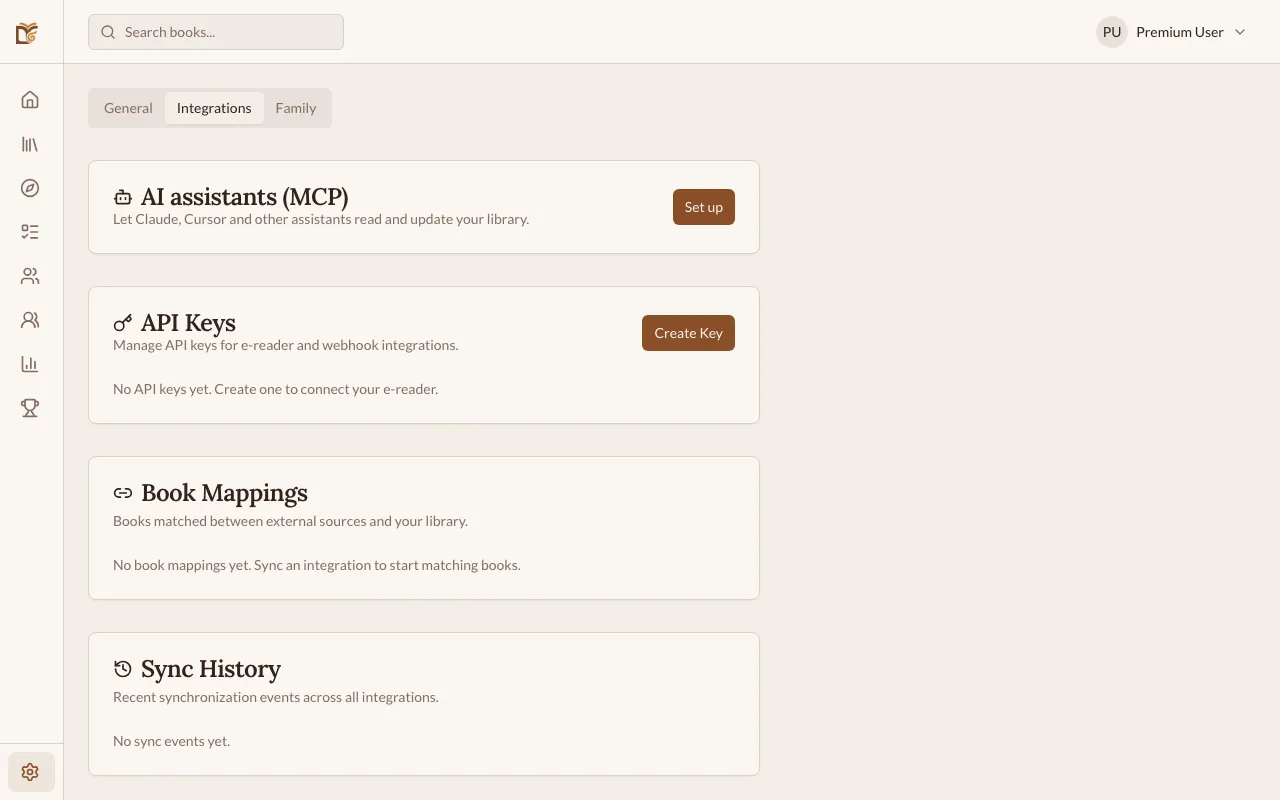
2. Configure KOReader
Section titled “2. Configure KOReader”In KOReader, go to Settings → Cloud storage → Progress sync → Custom server and enter:
- Server URL:
https://api.bookwormtracker.com/integrations/kosync - Username: Your Bookworm email
- Password: The API key you generated
3. Match Books
Section titled “3. Match Books”When KOReader syncs a book that Bookworm doesn’t recognize, it appears as an unmatched book:
- You’ll see an alert on your Dashboard.
- Click it to view unmatched books.
- For each unmatched book, you can:
- Search your library to link it to an existing book
- Search externally to find and import the book
- Import & link to add the book and link it in one step
Once linked, future syncs apply to the correct book automatically.
Generic Webhook
Section titled “Generic Webhook”For reading apps that don’t support KOSync, Bookworm offers a generic webhook endpoint. Any app or automation tool can send reading progress updates via a simple API call.
- Endpoint:
POST https://api.bookwormtracker.com/integrations/webhook - Authentication: Bearer token (your API key)
This is useful for custom integrations or automation tools like Tasker, Shortcuts, or n8n.
Google Play Books (Limited)
Section titled “Google Play Books (Limited)”Bookworm can connect to your Google Play Books account to import your library. Due to limitations in the Google Books API, this integration is more limited than the KOReader sync:
- Library import: Bookworm can discover books from your Google Play Books library and add them to your Bookworm library automatically.
- Reading position: Bookworm can read your current position in a book, but the data provided by Google’s API is limited and may not always be accurate.
- Manual sync only: Google’s API does not support real-time notifications. Syncing must be triggered manually (per book or full library) or happens via a daily background check.
- Go to Settings → Integrations.
- Click Connect Google Play Books.
- Authorize Bookworm to access your reading data.
- Use the Sync Library button to import your books, or sync individual books from their detail page.
Recommended KOReader Settings
Section titled “Recommended KOReader Settings”To get the most accurate reading sessions and time tracking, configure KOReader as follows:
Enable Sync on Open and Close
Section titled “Enable Sync on Open and Close”In KOReader → Settings → Cloud storage → Progress sync, enable:
- Sync on book open — sends your current position when you start reading, giving Bookworm a “session start” marker.
- Sync on book close — sends your position when you stop, giving Bookworm a “session end” marker.
Having both enabled gives Bookworm at least two data points per reading session, which is enough to estimate how long you read and how many pages you covered.
Enable the Statistics Plugin
Section titled “Enable the Statistics Plugin”KOReader has a built-in Statistics plugin that tracks detailed reading data locally on your device:
- In KOReader, go to Menu → Tools → Statistics.
- Enable the plugin.
This does not connect to Bookworm, but it’s useful for comparing your KOReader reading time against what Bookworm calculates — helpful if you want to validate sync accuracy.
Understanding Session Duration
Section titled “Understanding Session Duration”Bookworm estimates reading duration from KOSync data using a sliding 15-minute window:
- If two or more syncs arrive within 15 minutes of each other, Bookworm groups them into one session and calculates duration based on reading speed.
- If only one sync arrives (e.g., you read offline and synced only once), Bookworm records the pages but cannot estimate duration — that session will show pages but no reading time.
- Sessions with no estimated duration are still counted in your streak and page statistics.
Sync Details
Section titled “Sync Details”- KOReader: Progress syncs happen automatically when you read — usually when you open or close a book. The sync includes page number or percentage, and Bookworm creates reading sessions from the updates.
- Webhook: Progress is synced whenever your automation sends an update.
- Google Play Books: Synced only when you manually trigger it or via the daily background check. Imports books as “Want to Read” and updates progress for matched books when position data is available.