
Reading Sessions
Reading sessions are how Bookworm tracks your progress. Each session records what pages you read and optionally how long you spent reading.
Logging a Session
Section titled “Logging a Session”- Open a book that’s set to Currently Reading.
- Click Log Session (web) or tap the + button (mobile).
- Enter the starting page and ending page.
- Optionally enter the duration (how long you read).
- Save.
Your book’s progress bar updates automatically based on the pages logged.
Editing a Session
Section titled “Editing a Session”Made a mistake? You can edit any session:
- Open the book’s detail page.
- Find the session in the session history.
- Click the edit icon.
- Update the pages or duration.
- Save.
Deleting a Session
Section titled “Deleting a Session”- Open the book’s detail page.
- Find the session you want to remove.
- Click the delete icon.
- Confirm the deletion.
The book’s progress will be recalculated automatically.
How Progress Works
Section titled “How Progress Works”- Progress is calculated as:
(current page / total pages) × 100% - When your logged pages reach the total page count, the book is automatically marked as Finished.
- You can also manually mark a book as Finished at any time.
Tracking by Percent
Section titled “Tracking by Percent”Reading on a Kindle or another e-reader that only shows a percentage? Switch that book to percent and log the number your device shows — no calculator needed.
- Open the book’s detail page (it must be Currently Reading).
- Under the progress bar, find Track by and choose Percent.
- From now on, Log Session and the reading timer ask for the percentage instead of the page.
The setting is per book and you can switch back to Pages at any time. Each book keeps its own mode, so a paperback and an ebook can be tracked differently.
Session History
Section titled “Session History”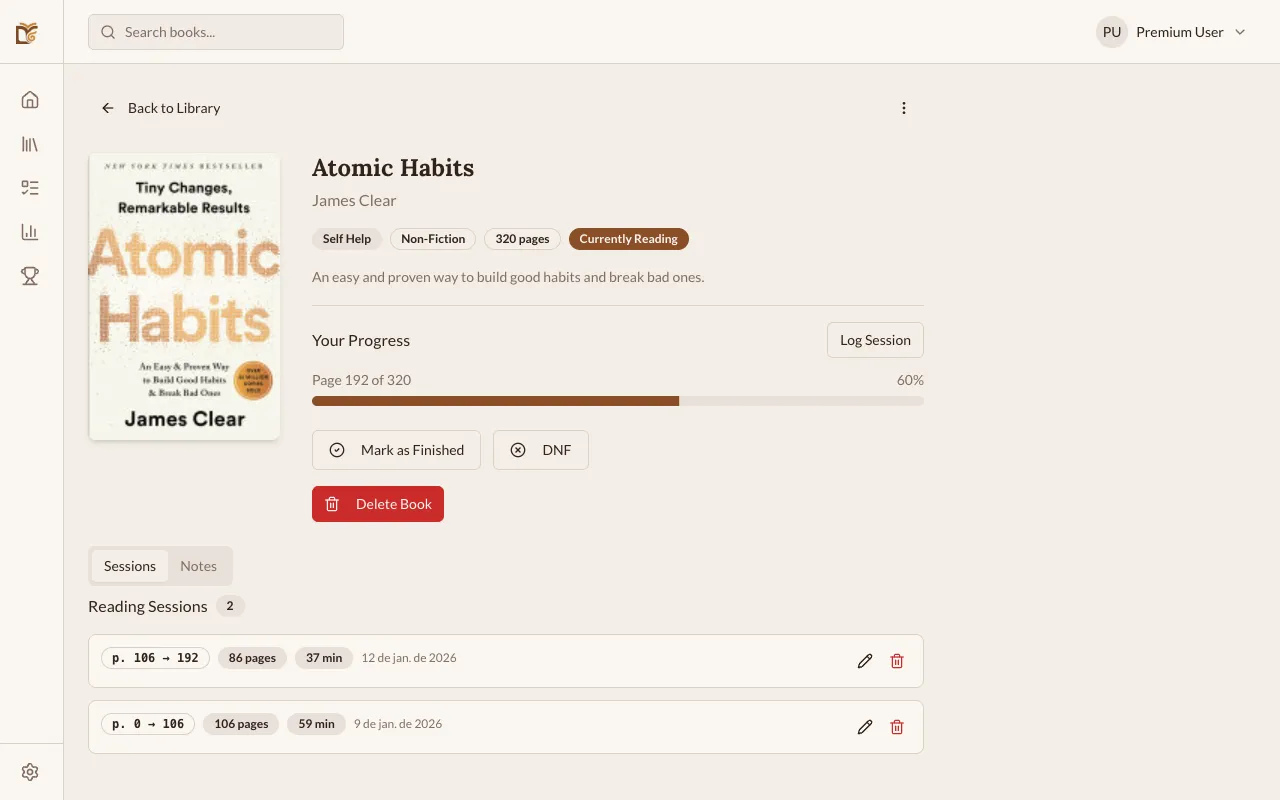
All your sessions are visible on the book’s detail page, sorted by date. Each entry shows:
- Date of the session
- Pages read (e.g., “p. 45 → 92”)
- Duration (if entered)
- Pages per session
Reading Pace Predictor
Section titled “Reading Pace Predictor”For books you’re currently reading, Bookworm shows a pace prediction below the progress bar:
- Pages per day — your rolling average from the last 7 sessions
- Predicted finish date — estimated date you’ll finish at your current pace
- Club deadline — if the book belongs to a book club with a deadline, Bookworm also shows how many pages per day you need to finish in time
The predictor only appears once you have at least one logged session for the book.