
Quick Start
Welcome to Bookworm! This guide walks you through the basics so you can start tracking your reading right away.
1. Create Your Account
Section titled “1. Create Your Account”- Go to app.bookwormtracker.com or download the mobile app from the App Store or Google Play.
- Click Sign Up and create an account with your email, Google, or Apple account.
- You’ll be taken to your Dashboard — your reading home base.
2. Add Your First Book
Section titled “2. Add Your First Book”- Click the + Add Book button in the top right corner (or tap it on mobile).
- Search for a book by title or author.
- Select the book from the search results.
- Choose a reading status:
- Want to Read — on your wishlist
- Currently Reading — you’re reading it now
- Finished — you’ve completed it
- DNF — you decided not to finish
- Click Add to Library.
3. Log a Reading Session
Section titled “3. Log a Reading Session”Once you have a book set to Currently Reading:
- Open the book from your library.
- Click Log Session (or + on mobile).
- Enter the pages you read (e.g., from page 1 to page 45).
- Optionally set how long you read.
- Save the session.
Your progress bar will update automatically.
4. Explore Your Dashboard
Section titled “4. Explore Your Dashboard”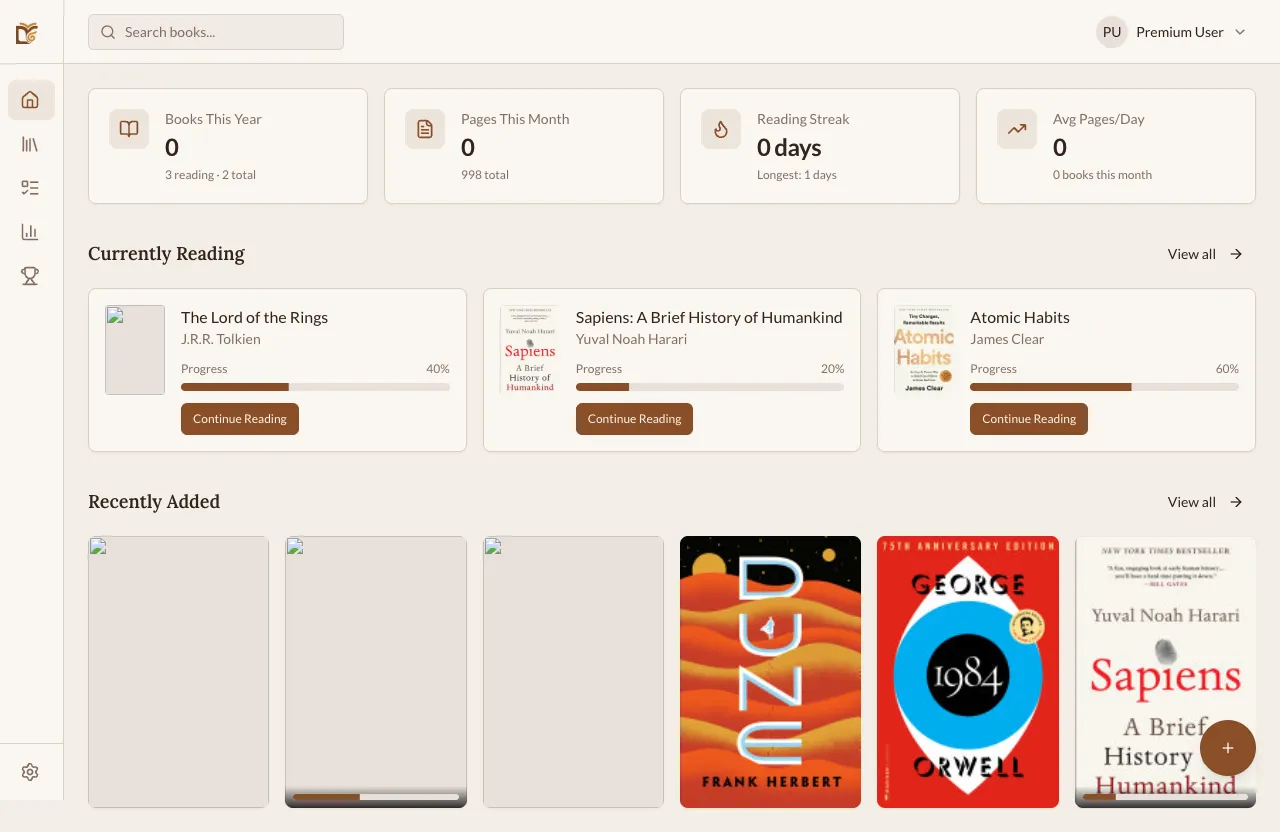
Your Dashboard shows:
- Currently reading books with progress bars
- Reading streak — how many days in a row you’ve read
- Recent activity — your latest sessions and finished books
What’s Next?
Section titled “What’s Next?”- Explore your Library to organize your books
- View your Statistics to see reading charts
- Set a Reading Goal to stay motivated
- Learn about Web vs Mobile differences